The free Mac gateway — one‑time, ~2 minutes
ShellSpeak on your iPhone controls Claude Code running on your own Mac. A small free helper — the ShellSpeak Gateway — runs on that Mac and bridges the two over your local Wi‑Fi. Your phone talks only to your Mac; nothing goes to any NYRAI or cloud server, and it uses your Claude — we never see your commands.
Get ShellSpeak Gateway (macOS) →On nyrai.ai · universal (Apple Silicon & Intel) · signed & notarized by Apple · free.
▶ Prefer to watch? See the animated walkthrough — how it works and every step, for Wi‑Fi and from anywhere.
claude --version works in Terminal. The gateway can’t do anything without it.Open the downloaded .dmg and drag ShellSpeak Gateway into
Applications. The first time you open it, right‑click the app → Open (this
confirms you trust an app downloaded outside the App Store — you only do it once).
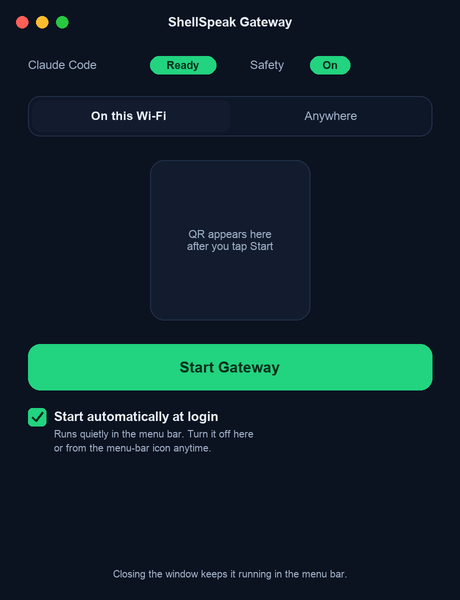
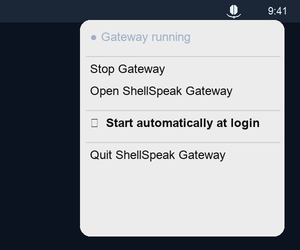
The window checks that Claude Code is installed (green dot = good). Click Start Gateway. A QR code appears. Leave it running — a mic icon in the menu bar (near the clock) shows it’s on.
Closing the window doesn’t quit the app — it keeps running in the menu bar. Re-open it from the menu-bar icon’s Open, or Quit there to stop completely.
Want it ready after every reboot? Tick “Start automatically at login” (in the window, or the menu-bar icon). It’ll launch quietly into the menu bar at login and start the gateway on its own — no window, no clicks. Untick it anytime (or in System Settings → General → Login Items).
On your iPhone: open ShellSpeak → Connect → Scan QR Code → point it at the code on your Mac. That’s it — start speaking.
If iOS asks for Local Network permission, allow it — the phone needs it to reach your Mac. (You can also turn it on later in iOS Settings → ShellSpeak → Local Network.)
On the same Wi‑Fi, ShellSpeak works out of the box. To reach your Mac from any network — cellular, another Wi‑Fi, anywhere — add Tailscale, a free, separate app that creates a private, encrypted link between your own devices. Your phone still talks only to your Mac (never the public internet), over the same certificate‑pinned connection. It’s entirely optional; the local Wi‑Fi setup above keeps working without it.
Get it on this Mac (tailscale.com/download/mac) and on your iPhone (tailscale.com/download/ios), and sign in to both with the same account. The free personal plan is enough.
In ShellSpeak Gateway, click Start Gateway — if Tailscale is installed, the helper launches it for you (you still sign in to Tailscale yourself). Once Tailscale is connected on both devices, the gateway opens on the Anywhere tab automatically and shows a QR for the private link; otherwise switch the toggle from This Wi‑Fi to Anywhere yourself.
Scan that QR in the ShellSpeak app just like before. From then on your phone can reach this Mac from any network — no need to be on the same Wi‑Fi.
Tailscale is a separate third‑party app and a trademark of Tailscale Inc. ShellSpeak works with it but is not affiliated with or endorsed by Tailscale.
Yes. The connection is encrypted and the gateway pins your Mac’s own certificate, so only your
phone (with the key from that QR) can connect. Every spoken command is screened against a safety
denylist — destructive operations like rm -rf, disk formatting, or “delete
everything” are blocked before they ever reach Claude Code, and deletions are sent to the
Trash rather than permanently removed.
Install it (setup guide) and
confirm claude --version works in Terminal, then click Start again. Apps opened from
the Finder don’t inherit your Terminal’s PATH; the gateway re‑reads your login
shell to find claude, but a very custom setup (nvm/asdf) may still hide it — put
claude on a standard path like /usr/local/bin.
Another program holds the port. Edit ~/.shellspeak/config.json, change
"port" (e.g. to 3100), and click Start again.
Make sure both devices are on the same Wi‑Fi, and on the phone that iOS Settings → ShellSpeak → Local Network is ON. Then re‑scan the QR code.
Make sure the Tailscale app is installed and signed in on both this Mac and your iPhone, using the same account. The gateway’s Anywhere tab updates on its own once both are connected — no need to re‑click. On the same Wi‑Fi, This Wi‑Fi works without any of this.
Click the mic icon in the menu bar (near the clock) → Quit. Closing the window alone only hides it — the gateway keeps running on purpose. By default it does not time out; it runs until you stop or quit it.